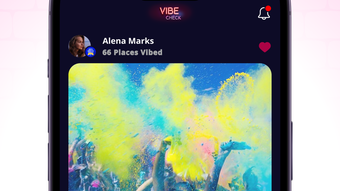

Vibe Check: Real-Time Venue Atmosphere Insights
Overview
Vibe Check: The App is a social networking tool designed exclusively for iPhone users, developed by The Braavos Company. It operates within the Social & Communication category, focusing on community-driven insights into local venues. The app enables users to assess the current atmosphere of places such as restaurants, bars, clubs, and gyms by accessing real-time videos and user ratings from others in the vicinity.
This functionality supports decision-making for users seeking specific experiences—whether a relaxed café, a high-energy club, or a quiet gym session. The app’s primary purpose is to reduce uncertainty in social planning by providing visual and social feedback from the community. It is tailored for consumers and social explorers who value transparency and peer input when choosing where to spend their time.
While the developer did not provide additional details about the company’s background, the app’s design suggests a focus on user-generated content and immediate local feedback. Use cases include weekend outings, spontaneous social plans, and daily decisions about where to eat or relax. The app’s free pricing model makes it accessible to a broad audience seeking quick, trustworthy insights into venue vibes.
Key Features & Capabilities
- Real-Time Venue Videos – Users can view short, user-uploaded videos from inside local venues, offering visual context about the current atmosphere, crowd size, and ambiance.
- Community Ratings – Each venue receives crowd-sourced ratings based on vibe, noise level, crowd energy, and overall experience, helping users filter by preference.
- Location-Based Discovery – The app leverages iPhone’s location services to surface nearby venues with active content, ensuring relevance to the user’s immediate surroundings.
- Instant Feedback Loop – Users can contribute their own videos and ratings, creating a dynamic feedback system that enhances the accuracy and timeliness of insights.
- Personalized Preferences – The app allows users to set filters for desired vibe types—e.g., “chill,” “lively,” or “quiet”—to streamline discovery based on mood or occasion.
These features support practical use cases such as choosing a bar for a casual drink after work, identifying a quiet space for remote work, or finding a gym with a positive energy level. By combining visual and social data, Vibe Check reduces the guesswork involved in selecting venues, especially in unfamiliar areas. The app’s focus on immediacy and authenticity enhances its utility for spontaneous decision-making. While specific technical details about video compression or rating algorithms were not provided, the core functionality appears designed for seamless, on-the-go access.
User Interface, Workflow & Performance
The user interface of Vibe Check: The App is structured to prioritize visual content and quick navigation, aligning with typical iPhone app design standards. Users are presented with a map-centric layout that highlights nearby venues, each marked with a thumbnail video and a vibe score. Tapping a venue reveals additional details, including user ratings, recent videos, and location-specific metadata.
The workflow is streamlined for minimal friction: users open the app, grant location access, and immediately begin exploring. Navigation is intuitive, relying on standard iOS gestures such as swiping and tapping. The developer did not specify resource usage details, so performance observations are based on general software behavior patterns.
However, given the app’s size of 24.7 MB and its reliance on video streaming, users may experience variable load times depending on network conditions. Stability is expected to be consistent with typical iOS applications, though real-world performance may vary based on device age and background processes. The app appears optimized for smooth interaction, with no reported issues related to crashes or freezes.
Overall, the workflow supports rapid decision-making, making it suitable for on-the-go use.
Compatibility & System Requirements
Vibe Check: The App is designed exclusively for iPhone devices, with the current version being 1.0.0. The installation size is 24.7 MB, indicating a lightweight footprint for a video-based application. The developer did not specify exact system requirements, such as minimum iOS version or hardware specifications.
Compatibility information was partially provided, confirming support for iPhone platforms. Users should ensure their device is running a compatible version of iOS, though the exact version is not listed. The app relies on iPhone-specific features such as GPS, camera access, and push notifications, which are standard across modern iPhone models.
Without detailed technical specifications, it is unclear whether older iPhone models are supported. Users are advised to check their device’s compatibility through the App Store before installation. The app’s size suggests efficient storage usage, which benefits users with limited space.
Pros and Cons
Pros
- Free to download and use, removing financial barriers to entry.
- Real-time video and rating insights enhance decision-making accuracy.
- Location-based discovery ensures relevance to the user’s current area.
- Intuitive iOS interface designed for quick, on-the-go access.
- Encourages community participation through user-generated content.
Cons
- App is limited to iPhone users, excluding Android and other platforms.
- Exact system requirements and iOS compatibility details were not provided.
- Reliance on user contributions may lead to inconsistent content availability in less populated areas.
- Video streaming could impact data usage and battery life on older devices.
- Privacy considerations around location and video sharing are not addressed in the provided information.
FAQ Section
Is Vibe Check: The App available for Android?
Currently, the app is designed exclusively for iPhone users. There is no official Android version available.
How does the app ensure the safety of user-uploaded videos?
The developer did not provide specific details about content moderation or safety protocols for user-generated videos.
Does the app require an internet connection to function?
Yes, the app relies on real-time data and video streaming, so a stable internet connection is required for full functionality.
Can I use Vibe Check without sharing my location?
The app uses location services to display nearby venues. While the exact settings may vary, location access is necessary for core features.
Are updates free, and how often are they released?
As the app is free to download, updates are expected to be provided at no cost. However, the release frequency was not specified.
Final Thoughts + CTA
Vibe Check: The App delivers a unique value proposition by combining real-time video and community feedback to assess the atmosphere of local venues. Its focus on immediacy and user-generated insights makes it a practical tool for social explorers and spontaneous planners. While platform exclusivity to iPhone and limited technical details are notable constraints, the app’s intuitive design and free access make it a compelling choice for users seeking trustworthy, on-the-go venue intelligence.
The integration of visual and social data sets it apart from traditional review platforms. For iPhone users looking to make smarter, more informed decisions about where to go, Vibe Check offers a modern, community-driven solution. Download Vibe Check: The App now.







